Brain Test Level 353 Walkthrough: Enlarge the Muscles
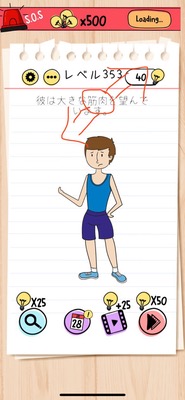
Brain Test Level 353 Walkthrough: Enlarge the Muscles
Complete Strategy, Step Explanation, Common Mistakes
🧩 Level Information
- Level Number:353
- Problem Statement:Zoom out and enlarge the word "muscles" using two fingers
- Difficulty:Easy
🎯 Objective
Use two fingers to manipulate the text "muscles" on the screen and make it appear larger.
📝 Steps to Solve
- Find the word "muscles" near the center of the screen.
- Place two fingers (e.g., thumb and index finger) simultaneously on the word "muscles" with one or both hands.
- Slightly spread the two fingers apart in horizontal or diagonal directions (a pinching-out movement).
- Continue spreading the fingers until the word "muscles" enlarges significantly, then release your fingers.
- If the text becomes large, the stage is cleared.
💡 Hints
- Remember the zooming operation used when viewing photos on a smartphone instead of tapping or swiping.
- Try directly manipulating the word "muscles" itself.
- Place two fingers on the word "muscles" and perform an outward pinching gesture.
🧠 Explanation and Points
This stage employs a puzzle that utilizes the unique smartphone gesture of ‘zooming out and enlarging with two fingers’ on screen objects. Typically, the image of 'zooming out' is 'shrinking', but here it refers to ‘touching with two fingers and spreading outward = enlarging’, becoming a minor trick due to the discrepancy between words and intuition. The key is whether players can envision using the enlargement gesture employed in photo viewers or map apps rather than simple tap or drag actions. The text is an interactable object, not just decoration, and understanding the standard use of two-finger gestures in the Brain Test series makes it an easy problem to solve.
🔍 Common Mistakes
- Attempting to enlarge merely by repeatedly tapping the word "muscles".
- Dragging or holding the text to display a menu.
- Swiping the entire screen searching for something elsewhere.
- Using a pinching motion to move inward with two fingers (pinch-in) and misunderstanding the lack of change.
- Continuously searching for buttons like settings or zoom function.
🎉 Post-Clear Advice
Success in powering up by making the word muscles larger! This level should have reinforced the ability to directly manipulate text or objects with two fingers. In future stages, the insight to try varying gestures will be helpful.