Brain Test Level 83 Walkthrough: Turn off the right light bulb and turn it on with the second button from the left
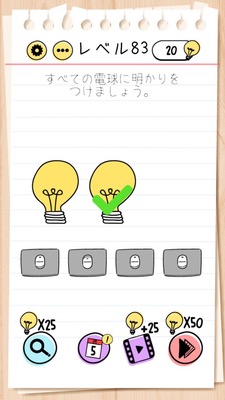
Brain Test Level 83 Walkthrough: Turn off the right light bulb and turn it on with the second button from the left
Complete walkthrough, step-by-step explanation, common mistakes
🧩 Level Information
- Level Number: 83
- Prompt: Swipe the right light bulb off the screen. Press the second button from the left to turn on the bulb.
- Difficulty: Medium
🎯 Objective
Move the unnecessary bulb and turn on the light with the correct button.
📝 Steps to Solve
- Long press the light bulb on the right with your finger.
- Swipe right and move the bulb off the screen.
- Ensure the right bulb is completely invisible.
- From the buttons arranged at the bottom (or bottom center) of the screen, locate the second button from the left.
- Tap the second button from the left once.
- If the remaining bulb lights up, you have cleared the level.
💡 Hints
- First, focus on the "right light bulb," and try operations other than tapping directly.
- The light bulb is not fixed. Check if you can move it by dragging or swiping.
- After moving the right bulb off the screen, recheck the button positions.
- The second button from the start, i.e., "second from the left," is the correct button this time.
🧠 Analysis & Key Points
This stage is a trick question designed to break the preconception that objects on screen are fixed. The instruction "Swipe the right light bulb off the screen" is the direct solution, so if you read the text as part of the puzzle rather than a directive, you cannot solve it. Players tend to press all the buttons at random or tap the right light bulb itself, but the point is to realize you can move the bulb. By removing the right bulb, you're left with a situation where you only need to press the correct button (second from the left) corresponding to the remaining bulb, requiring a shift in thinking.
🔍 Common Mistakes
- Trying to tap the right light bulb to turn it on.
- Not knowing which button is correct and frantically pressing all buttons.
- Only thinking about changing the order of button pressing without realizing the possibility of moving the bulb itself.
- Dragging the right bulb only slightly but stopping, not moving it completely off-screen, failing the criteria.
🎉 Post-clear Advice
By lighting up the bulb and noticing the trick of "moving the right bulb away then pressing the second button from the left," you'll develop a habit of always questioning whether objects can be moved. In the next stage, try seeing if the displayed elements are truly fixed or not; it can be helpful.