Brain Test Level 102 Walkthrough: Cut the Trapezoidal Origami with a Cutter
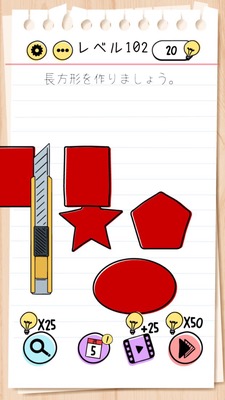
Brain Test Level 102 Walkthrough: Cut the Trapezoidal Origami with a Cutter
Complete Solution, Step-by-Step Explanation, Common Mistakes
🧩 Level Information
- Level Number: 102
- Challenge: Cut the trapezoidal origami with a cutter
- Difficulty: Normal
🎯 Objective
Use the cutter on the screen to make a straight cut through the trapezoidal origami in a single motion.
📝 Steps to Solve
- Check the 'trapezoidal origami' in the center of the screen. It is a trapezoid with a short top edge and a longer bottom edge.
- Find the 'cutter' icon (a tool with a blade) placed somewhere on the screen.
- Long press the cutter with one finger and drag it over to the origami.
- With the tip of the cutter touching the desired position on the origami, slide your finger left and right to trace over the paper.
- While tracing, if the cutter's blade passes over the origami, it will be cut, and you will succeed.
- If you fail along the way, release your finger and drag the cutter again, tracing in the same manner.
💡 Hints
- First, find the cutter and try to move it close to the origami.
- The cutter cuts the paper not by 'tapping', but by 'dragging and tracing'.
- Like a continuous line, pass smoothly over the origami without lifting your finger.
- There is no need to move the origami itself. Only the cutter needs to be moved.
🧠 Explanation and Points
This stage tests your awareness of 'how to operate' rather than special tricks or hidden items. Many players initially think that simply tapping the cutter will automatically cut, but in reality, you need to drag and trace over the paper. Although given as a trapezoid, the exact position to cut is not specified; the act of 'properly using the cutter to cut the paper' itself is the right condition. Therefore, moving or tracing objects on the screen—a unique approach of Brain Test—is the key.
🔍 Common Mistakes
- Getting stuck by just tapping the cutter and nothing happens.
- Trying to swipe the origami itself to move it.
- Thinking that placing the cutter on the paper will cut it without dragging and tracing.
- Attempting to pinch in or out the origami to change its shape or size.
🎉 Post-Clear Advice
Successfully clearing the stage requires realizing that the cutter must be traced and used. This trains you to think beyond just tapping and consider dragging in future stages. The next level may involve combining objects together or using operations with multiple fingers.