Brain Test Level 114 Walkthrough: Where are the slow letters?
Brain Test Level 114 Walkthrough: Where are the slow letters?
Complete Guide・Step-by-step Explanation・Common Mistakes
🧩 Level Information
- Level Number: 114
- Task: Tap on the character for slow
- Difficulty: Medium
🎯 Objective
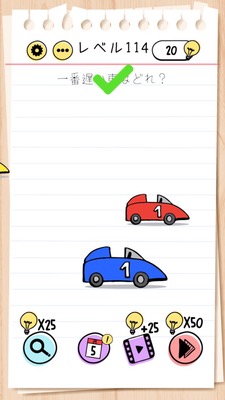
Clear the level by tapping on the words 'slow' itself written within the task description.
📝 Steps to Solve
- Carefully observe the entire screen, focusing not on buttons or characters but on the 'text'.
- Look for the problem statement "Tap on the character for slow" displayed at the top (or center).
- Thoroughly check the two letters 'slow' ("遅" and "い") within the problem statement.
- Without touching buttons or images, directly tap on the 'slow' part of the problem statement.
- If tapped correctly, the level will be cleared.
💡 Hints
- The answer is not in the characters or buttons, but within the 'text'.
- Read the task statement at the top of the screen carefully and look for the 'slow' within it.
- Tap on the 'letter of the word' 'slow', not on something that is 'literally slow'.
🧠 Explanation & Key Points
This stage is a trick puzzle type that uses the player's preconceptions. When told to "tap on the character for slow," many people look for seemingly slow characters (like a turtle, sloth, or slow-walking person) or buttons that are slow. However, the actual correct answer is not those objects, but the word 'slow' within the task statement displayed at the top of the screen. The key point is that it specifies the 'letter' and not the meaning. By reading the sentence straightforwardly and not being swayed by graphics, focus on "which letter should be pressed?" to solve the puzzle.
🔍 Common Mistakes
- Accidentally tapping on characters that seem slow (like a turtle or sloth).
- Tapping on objects moving slowly or animations that are slow.
- Pressing buttons with similar words like 'fast' or 'quick'.
- Only searching for buttons without tapping the actual text of the task.
- Accidentally tapping near 'slow' and thinking it's unresponsive because the judgment isn't accurate.
🎉 Advice After Clearing
Once you realize that the task statement is the answer, it becomes easier to deal with similar trick questions in the future. In the future levels, be mindful that the 'text' or 'sentence' itself on the screen could be the answer, not just the objects.