Brain Test Level 167 Walkthrough: Make the Cannons Face Each Other
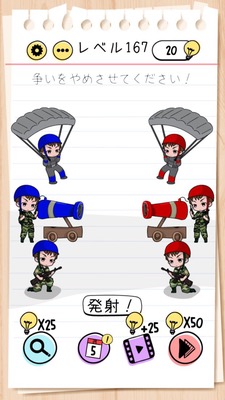
Brain Test Level 167 Walkthrough: Make the Cannons Face Each Other
Complete Walkthrough, Step-by-Step Explanation, Common Mistakes
🧩 Level Info
- Level Number: 167
- Problem Statement: Make the cannons face each other
- Difficulty: Normal
🎯 Objective
Arrange the two cannons on the screen so they face each other.
📝 Steps to Solve
- Step 1: Check the two cannons on the screen. They are facing the same direction and are not facing each other yet.
- Step 2: Try to long press and drag one of the cannons either to the left or right.
- Step 3: Slowly slide the draggable cannon near the other cannon (to its front side).
- Step 4: Overlap/bring them close so the mouths of both cannons face each other, they will automatically change direction and face each other.
- Step 5: The stage is cleared once the two cannons are properly facing each other.
💡 Hints
- Hint 1: Look carefully at the cannons themselves and try touching them.
- Hint 2: Even objects that seem fixed can sometimes be dragged. Try moving the cannon.
- Hint 3: Bring one of the cannons closer to the other and adjust their position so the mouths face each other.
🧠 Explanation & Points
The goal of this stage is to break the assumption that "background objects cannot be moved." Visually, the cannons seem fixed to the floor or base, but they are actually draggable, allowing the player to freely change their position. Many players initially try to rotate the screen or use gestures to change the direction of the cannons, or tap on the barrel to spin it. However, the solution to this puzzle is not to directly change the direction, but to create a "facing each other" situation by altering the positional relationship of the cannons. Therefore, it is crucial in this level to think creatively about positioning, such as bringing objects closer or overlapping them.
🔍 Common Mistakes
- Expecting the orientation of the cannons to change by rotating the smartphone or tablet itself.
- Trying to change direction by tapping/swiping only the barrel part of the cannon.
- Believing that there is a mechanism to switch the orientation of the cannons by searching for buttons or other objects on the screen.
- Assuming the cannons are part of the background and not testing the possibility of dragging to move them.
🎉 Post-Clear Advice
This type of stage gives you an "Oh really?!" moment when you realize the background cannons can be moved. Continue to proactively touch and test items that appear fixed in future levels for smoother strategy execution.