Brain Test Level 148 Walkthrough: Set the Minute Hand to 12 o'clock
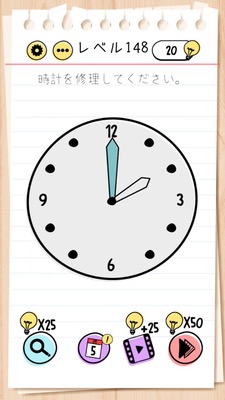
Brain Test Level 148 Walkthrough: Set the Minute Hand to 12 o'clock
Complete Guide & Step-by-Step Instructions & Common Mistakes
🧩 Level Information
- Level Number: 148
- Task: Set the minute hand to 12 o'clock
- Difficulty: easy
🎯 Objective
Drag the minute hand of the clock and align it precisely to the 12 position.
📝 Solution Steps
- Check the analog clock displayed in the center or at the top of the screen.
- Look for the long and thin hand (minute hand) on the clock face. Be careful not to mistake it for the short hand (hour hand).
- Place your finger near the tip or base of the minute hand, then drag to rotate it.
- Slowly adjust by rotating until the minute hand perfectly aligns with the '12' position.
- When the minute hand stops exactly at the 12 o'clock position, release your finger to clear the stage.
💡 Hints
- Try moving the longer hand, not the shorter one.
- Instead of just tapping, see if you can drag and rotate the hand.
- Rotate it little by little until it precisely reaches the 12 position.
🧠 Analysis & Key Points
This problem tests your capability to visually recognize and discover dragging actions, serving as an intuitive puzzle. The solution is straightforward as provided in the task instructions, with almost no twists involved. The key points are to clearly distinguish the "minute hand" and realize the operation "drag to rotate" instead of "tap." Many players initially attempt to tap on the clock itself or the time display numbers, but as soon as they realize that the hand itself can be moved, the problem is solved quickly. This stage in the Brain Test series functions as a foundational one to teach patterns like swiping or dragging objects.
🔍 Common Mistakes
- Attempting to move the hour hand and failing.
- Trying to tap only on the clock face or numbers (like '12') to solve it.
- Attempting to change the time by interacting with buttons or other UI elements at the bottom of the screen.
- Giving up assuming it’s unsolvable due to a lack of response to tapping on the hands (not realizing the need for drag operations).
🎉 Advice After Clearing
Once the minute hand is correctly set to 12 o'clock, the clock is recognized as showing the correct time, leading to a stage-clear animation. Remembering that you can move the hands by dragging them will be useful for future clock or rotation puzzles.