Brain Test Level 394 Walkthrough: Tap the question mark twice
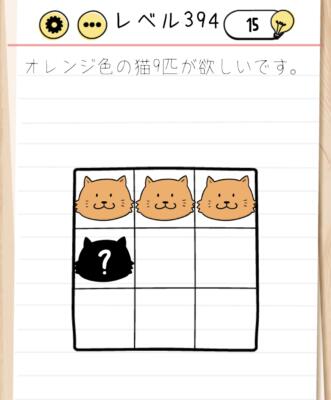
Brain Test Level 394 Walkthrough: Tap the question mark twice
Complete Walkthrough, Step-by-Step Guide, Common Mistakes
🧩 Level Information
- Level Number: 394
- Problem Statement: Tap the question mark twice to make it like the image
- Difficulty: Normal
🎯 Objective
Simply tap the "?" mark on the screen twice to make it the same as the reference image.
📝 Steps to Solve
- Look around the entire screen and search for where the "?" mark is. It's usually near the problem statement or displayed small at the edge of the screen.
- Tap the "?" mark not just once, but twice in succession. Think of it as a quick double tap.
- After tapping twice, if the display or the number of "?" marks changes and matches the 'state like the image' in the problem statement, you clear the level.
💡 Hints
- The key is to read the problem statement as is. No special actions are needed.
- Check if there's a small "?" mark displayed somewhere, including screen corners and UI parts.
- Pay attention to the instruction 'tap', not swipe or drag. You need to tap twice in succession, not just once.
- Before trying complex gestures like long press, lightly tap the "?" twice as instructed.
🧠 Explanation & Points
This level is a typical "read as is" puzzle where the instruction ‘tap the ? mark twice to make it like the image’ is the answer itself. Players often try to find differences with the reference image or move objects to match shapes, but in reality, simply tapping the "?" mark twice meets the condition. In Brain Test, many levels have problem statements that are solutions themselves, and this one is no exception. The key points are "don't look for special tricks" and "follow the instructions to tap the specified number of times".
🔍 Common Mistakes
- Failing to read the problem statement and instead trying to move or combine objects in the image.
- Assuming the method is wrong due to not getting a response from tapping the "?" mark only once.
- Overlooking the instruction to tap twice by trying other gestures like long press or swipe.
- Being too focused on the reference image and missing the small "?" mark on the screen.
🎉 Advice After Clearing
This stage teaches the importance of receiving instructions straightforwardly without overthinking them. For upcoming levels, it helps to first carefully read the problem statement before trying unnecessary actions.