Brain Test Level 381 Walkthrough: Pull Triangles from the Center and Align the Angles
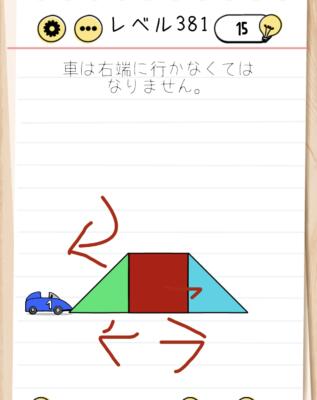
Brain Test Level 381 Walkthrough: Pull Triangles from the Center and Align the Angles
Complete Walkthrough, Step-by-Step Explanation, Common Mistakes
🧩 Level Information
- Level Number: 381
- Problem Statement: Swipe right from the center to bring out a triangle, swipe left to bring out another triangle, and swipe to align the angles.
- Difficulty: Hard
🎯 Objective
Swipe left and right from the center of the screen to bring out triangles, then use further swipe operations to correctly align the triangle angles.
📝 Steps to Solve
- First, focus around the center of the screen and realize you can swipe from the center even if it seems empty.
- Drag your finger to the right (right swipe) from the center of the screen to pull out a triangle on the right side.
- Next, drag your finger to the left (left swipe) from the center to pull out another triangle on the left side.
- After the two triangles appear, confirm that you can swipe near the triangles to change their angles.
- Swipe up or down or draw circles near either triangle (or near the center) to adjust the triangle angles.
- Fine-tune the angles until both triangles are aligned in the correct orientation/angle.
- The level is cleared once the angles are aligned as specified.
💡 Hints
- Consider whether the "empty center" can also be manipulated, not just the visible buttons and shapes on the screen.
- The key is swiping, not tapping, and the movement is from the center to the sides.
- Swipe right from the center to reveal the first triangle, and swipe left to reveal another triangle.
- Even after revealing the triangles, there is more to do by swiping. Adjust the triangle angles by swiping up or down or drawing circles.
- After revealing both triangles, align the angles by swiping to clear the level.
🧠 Explanation & Points
This level is a puzzle that tests whether you can notice the "invisible operation area" and "multiple swipe operations." At first glance, the center of the screen seems empty, so you might only look for tappable items, but in reality, 'swiping from the center' is the trigger. You need to discover in two stages: first, right swipe from the center to bring out a triangle, then left swipe to bring out another triangle. Additionally, after revealing the triangles, you're not done yet; further swiping is required to adjust the angles, making it tricky. The target here is not a button but the "triangle angle," so flexibility in trying changes through swipes like drawing circles is required. Overall, this is not a simple tap solution but an applied problem combining swipes in different directions.
🔍 Common Mistakes
- Continuously tapping only the visible buttons or shapes and not trying swipes on the center.
- Only performing large swipes from edge to edge without trying short swipes near the center.
- Believing one direction (right swipe) alone can solve it and not trying left swipes.
- Thinking you have solved the puzzle once the triangles appear and not trying additional angle adjustment swipes.
- When aligning the triangle angles, only attempting taps or long presses and not trying swipes up/down or in circles.
- Attempting to rotate the device itself to align angles without realizing triangles on the screen can be rotated by swiping.
🎉 Advice After Clearing
It was a tricky level full of swipe operations, where you needed to pull out shapes from the invisible center and finely adjust angles by swiping. Consider looking for hidden operations and multiple-step mechanisms in the next stage as well.