Level walkthrough
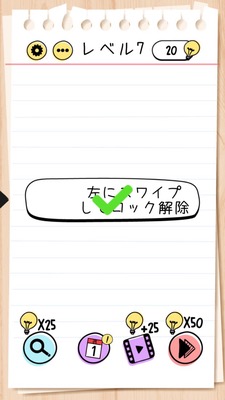
Brain Test Level 7 Walkthrough: Swipe the Arrow Left
Brain Test Level 7 Walkthrough: Swipe the Arrow Left
Complete guide, step-by-step instructions, common mistakes
🧩 Level Information
- Level Number: 7
- Question: Swipe the arrow to the left
- Difficulty: Easy
🎯 Objective
Swipe the arrow mark displayed on the screen to the left with your finger to clear the stage.
📝 Steps to Solve
- Locate the arrow like '→' displayed near the center of the screen.
- Confirm that nothing happens when you tap the arrow itself (tapping is not the solution).
- Place your finger on the arrow and slide (swipe) it to the left.
- If the arrow moves to the left and the level clear message appears, you have succeeded.
💡 Hints
- As stated in the question, you need to perform the action of 'swiping the arrow to the left'.
- Not just tapping the arrow, but the gesture of 'swiping (tracing with your finger)' is necessary.
- Try dragging from right to left with your finger.
🧠 Explanation and Points
This level is a simple, tutorial-oriented stage that can be solved by performing the operation as instructed in the question. It aims to teach the gesture of 'swiping' instead of 'tapping', and the point is to make the player realize they can move objects on the screen. Without any special twists, you can clear the level simply by swiping the arrow to the left.
🔍 Common Mistakes
- Tapping the arrow multiple times.
- Swiping around the arrow without selecting the arrow itself.
- Swiping up, down, or to the right and mistaking it for no response.
🎉 Advice After Clearing
You've learned the swipe operation! In future levels, try moving various items.