Level walkthrough
Brain Test Level 13 Walkthrough: Press the Button on the Kettle
Brain Test Level 13 Walkthrough: Press the Button on the Kettle
Complete Walkthrough, Step-by-Step Guide, Common Mistakes
🧩 Level Information
- Level Number: 13
- Task: Press the Button on the Kettle
- Difficulty: Easy
🎯 Objective
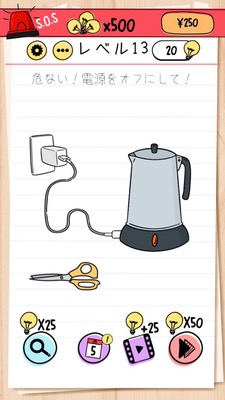
Tap on the button of the kettle displayed on the screen.
📝 Steps to Solve
- Locate the kettle (electric pot) near the center of the screen.
- Find a small round button (switch) near the kettle's body or handle.
- Tap on the button of the kettle once.
- If the kettle activates when the button is pressed, you clear the level.
💡 Hints
- According to the task, just focus on 'pressing the button'.
- Instead of focusing around the kettle, look for 'the button itself' and tap it.
- Complex actions like long press or swipe are unnecessary. A light tap will suffice.
🧠 Explanation & Points
This level is a straightforward tutorial-like problem without any twists. The instruction 'press the button on the kettle' is the solution itself, teaching players that they can interact with on-screen objects by directly tapping them. In Brain Test, this fundamental idea of 'taking instructions literally' and 'tapping directly on buttons and components on the screen' becomes crucial in later levels. There are no special steps or hidden elements, and the key point is visually locating the button and pressing it.
🔍 Common Mistakes
- Tapping the body or handle of the kettle and not pressing the essential button.
- Trying complex operations like long pressing or swiping.
- Tapping another item (like a cup or socket) if present, and missing the essential button.
🎉 Post-Clear Advice
Once you press the kettle's button, you clear the level. Learning here that 'buttons or small components on the screen are also tap targets' will help you progress smoothly in future levels.