Dreamy Room Level 250 Walkthrough & Guide
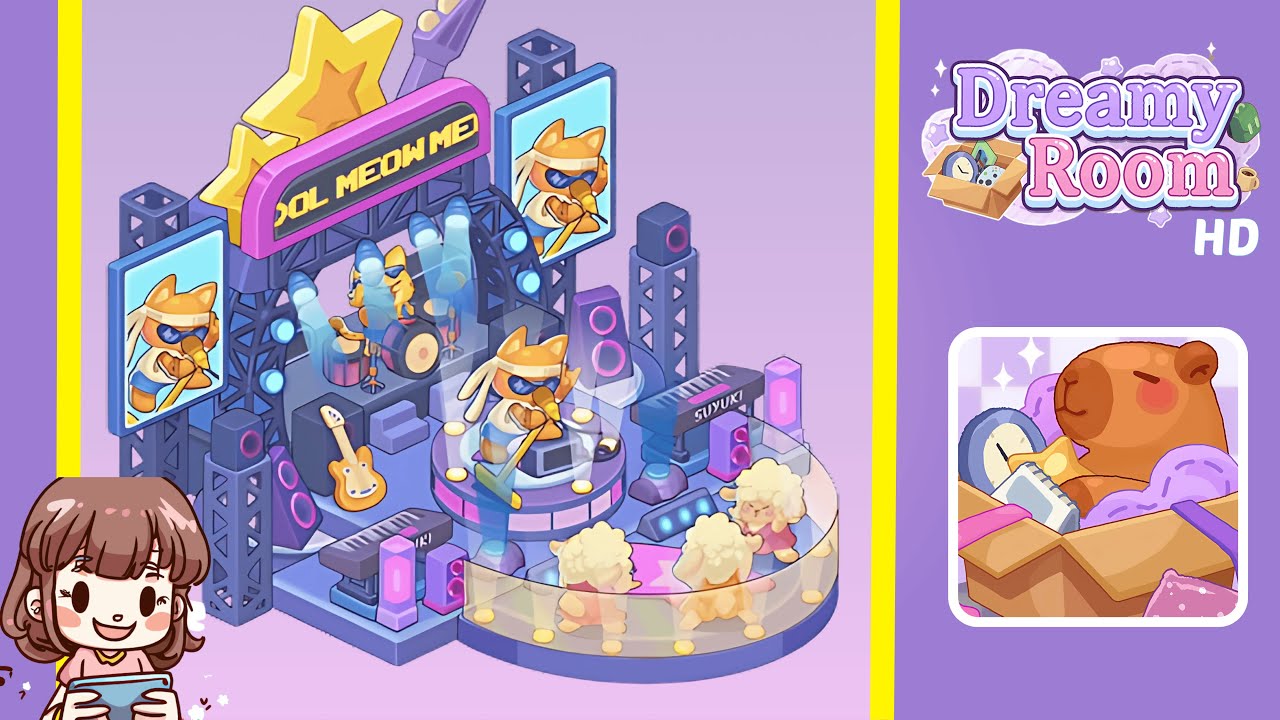
Welcome to the comprehensive walkthrough for Dreamy Room Level 250. This guide will walk you through the process of arranging platforms, signage, lighting, instruments, and audience props to recreate the charming stage scene presented in the final image. Drawing on the official Dreamy Room instruction manual, we offer a detailed, step-by-step breakdown for this level.
Step-by-Step Guide
- Place the light blue L-shaped floor panel flush against the bottom edge of the room, with the notch facing the entrance. Next, position the darker grey rectangular platform at the top center, behind the blue panel, aligning both pieces perfectly with the room's borders.
- Place four black steel truss towers at each corner: two at the front left and right corners of the blue panel, and two at the back left and right corners of the grey platform, ensuring they're equidistant from the center axis.
- Mount the two vertical LED screens at mid-height on the left and right scaffolding towers, displaying the cat singer image towards the stage center. Attach the pink neon "MEOW MEOW" sign to the crossbeam between the front two towers, centering the yellow pixel text within the pink frame.
- Place four moving-head spotlights on the upper crossbars: two on the front bar aimed at the podium, and two on the rear bar aimed at the drum kit. Position the tall black speakers with pink ring accents at the base of the scaffolding towers, and smaller speaker boxes near the keyboard and guitar stand.
- Position the red and black drum kit on the grey platform, centering the bass drum and assembling the other parts. Set the electric guitar on a stand to the left, and place the "SUYUKI" keyboard on the right, facing the audience. Place the cat singer figure on the round podium, microphone in hand.
- Place the transparent curved barrier in front of the podium, forming a semi-circle, and add three sheep fan characters behind it, evenly spaced. Position the middle sheep slightly forward, angling the others inward.
- Attach three golden stars on the back scaffolding—one large, centrally on top, and two smaller below. Place six circular floor lights evenly around the podium's edge, and add two vertical neon light columns near the keyboard and guitar for accents.
Notes & Precautions
- Alignment Is Key: Ensure all floor panels and scaffolding towers are perfectly aligned to avoid complications in later steps.
- Layer Order Matters: Build from back to front—starting with the floor, then towers, screens, lights, instruments, and finally the audience.
- Object Snapping: Utilize the snapping guides to securely lock each piece into place.
- Rotation and Flipping: Carefully check the object preview before placement to prevent unwanted flips.
- Undo Cautiously: Use undo sparingly to maintain awareness of your progression.
Tips & Tricks
- Grid Reference: Mark reference lines for faster placements.
- Zoom and Pan: Use zoom and pan to accurately position small items.
- Batch Placement: Group and place similar objects consecutively for efficiency.
- Use Preview Mode: Toggle the overlay to check object boundaries before final placement.
- Save Often: Regular saving after each major step avoids data loss.