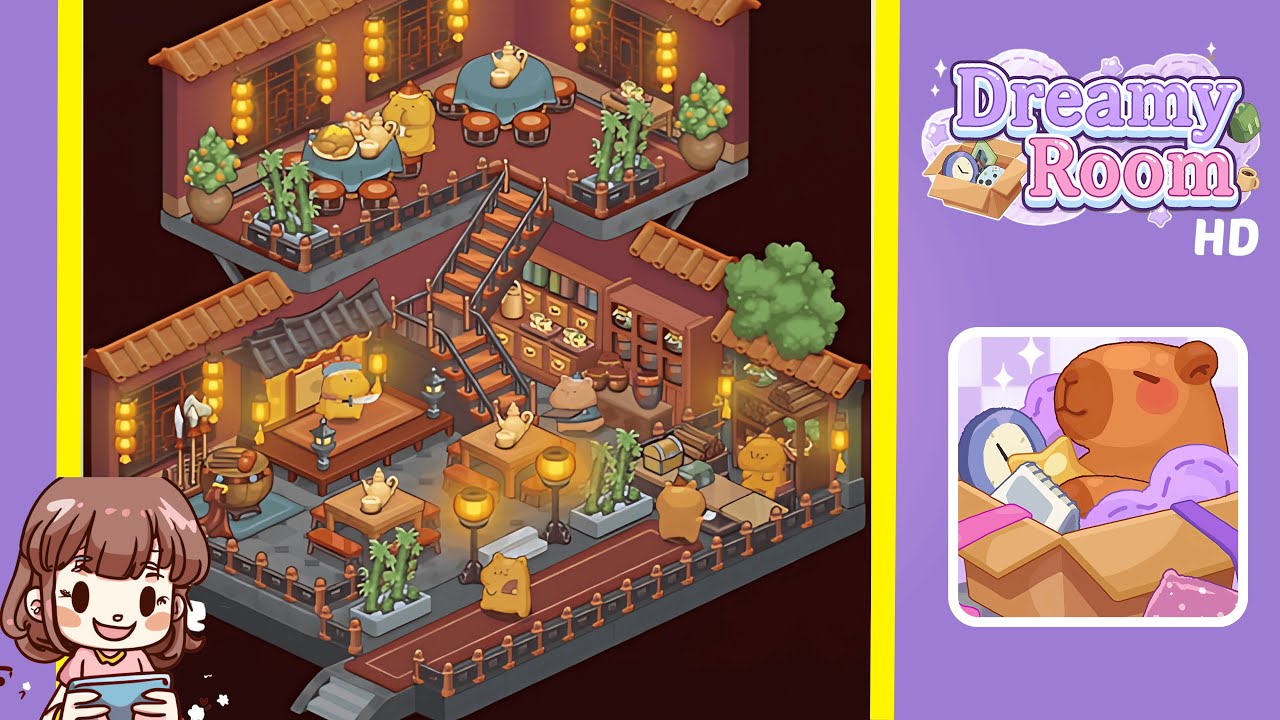
Dreamy Room Level 249 Walkthrough & Guide
This walkthrough provides a step-by-step guide to transforming Dreamy Room Level 249 into a cozy, memory-filled haven. Experience the art of crafting a living narrative through décor without time constraints or pressure.
Step-by-Step Guide
- Place the roof eaves along the upper walls by selecting the terracotta roof tiles and aligning them seamlessly across the top edges of the left and back walls to create a visual anchor.
- Lay the dual-pattern flooring for both levels, using interlocking hexagonal tiles for the upper half and rectangular slate tiles for the lower half, ensuring seamless transitions and alignment.
- Add surrounding decorative railings on both floors, attaching wood-and-brass segments to enclose walkways and balconies, while maintaining precise rotation.
- Install the central staircase to connect the floors, positioning it centrally within the lower floor railing gap for perfect alignment with the tile edges and upper landing.
- Arrange the tea tables and round stools: place tea tables with blue cloths and red-cushioned stools on the upper level, and square tables with benches on the lower level.
- Place bamboo planters and orange tree pots, ensuring symmetry and alignment with the floor tiles on both levels for a balanced greenery effect.
- Hang lanterns and place decorative windows; evenly distribute yellow lanterns above seating areas and replace wall segments with wooden lattice windows for theme consistency.
- Add shelves, jars, and scrolls on the right wall, utilizing the wall storage section to mount multi-tier shelves and fill them with jars, books, and scrolls for authenticity.
- Place specialty decorations like the weapon stand, drum, chest, and scroll rack to enhance the warrior’s storage nook while ensuring balanced composition.
- Add character figurines and final touches, positioning bear figurines in the tea ceremony theme and adding extra teapots for a complete transformation.
Notes & Precautions
- Ensure proper snapping of assets to avoid unfillable gaps; use the undo feature for misplacements to prevent further offsetting.
- Zoom in on the grid before finalizing positions to verify alignments and prevent errors during asset placement.
- Track menu inventory to prevent items from being hidden behind layers; frequently save progress as the game does not auto-save between changes.
Tips & Tricks
- Preload essential assets into quick-access slots to avoid menu scrolling during design.
- Batch place floor tiles and railings to reduce placement errors and achieve smoother results.
- Toggle collision boundaries for easier large structure placements and use copy-paste for symmetry.
- Work from the background forward to adjust foundational elements before adding smaller decor for faster updates.