Dreamy Room Level 241 Walkthrough
Welcome to the Dreamy Room Level 241 walkthrough. This guide provides a comprehensive look at how to navigate and complete each task in this beautifully designed level, ensuring every component aligns with the serene environment.
Step-by-Step Guide
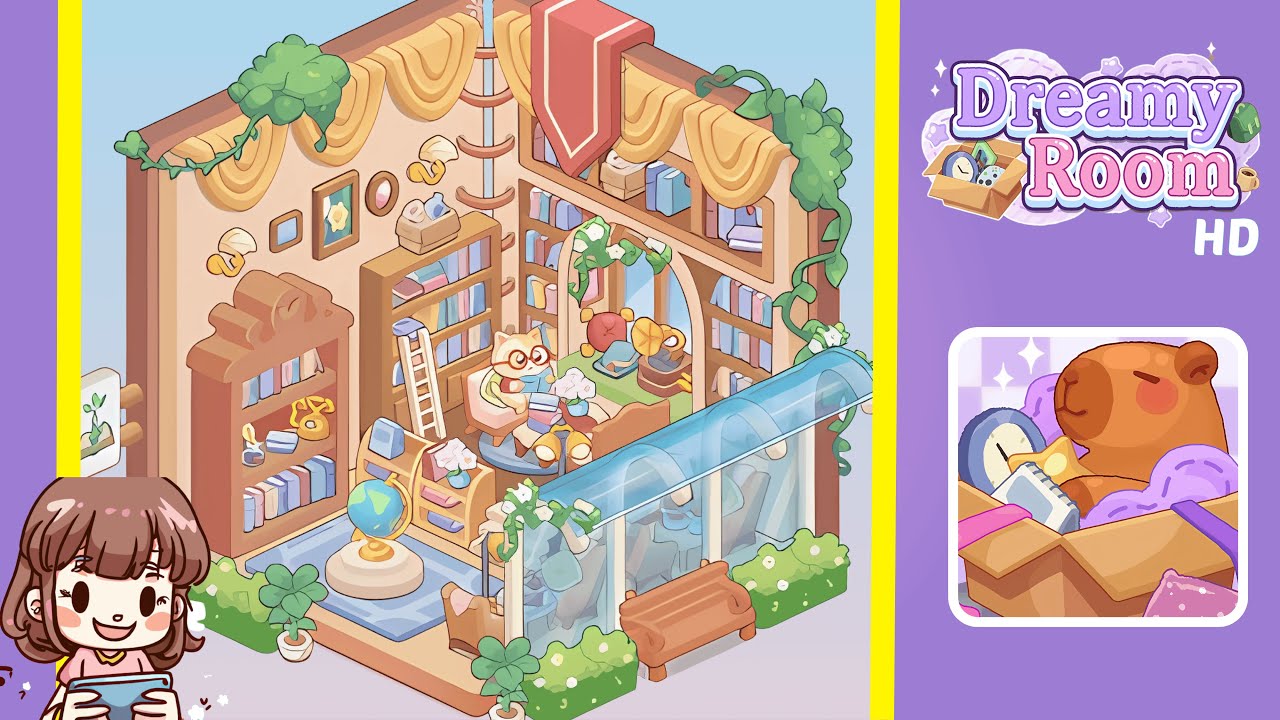
- Lay the floor panel: Start with an empty hexagonal floor panel and rotate and position the main ground piece so its beveled edges align with the adjoining walls. Ensure the floor panel's bottom edge sits flush with the camera angle.
- Position walls and hang yellow drapes: Rotate and snap the left and right panels into their slots to form a three-sided study corner. Align the top edges of each wall segment with the floor panel and attach soft yellow drapery pieces, framing the window openings.
- Assemble bookshelves and install wall sconces: Place the tall arched bookshelf against the left wall, aligning its scalloped crown molding with the wall's upper edge. Add the smaller rectangular bookcase beside it, and attach two decorative mushroom-shaped wall sconces on either side of the central shelf.
- Install overhead storage and ladder: Place the long overhead storage bench below the ceiling frame. Fill it with pastel-colored books and small storage boxes, ensuring each book's spine faces outward. Lean a wooden rolling ladder against the left side of the back wall bookshelf.
- Create the cozy reading nook with furniture and accessories: Place the circular reading platform over the rectangular blue rug, then add a cozy armchair with a cat character figurine on the seat. Position a small side table beside the chair with a vase of white blossoms.
- Place floor accessories and construct the greenhouse extension: Position an ornamental globe on the blue rug and add an antique rotary telephone and brass gramophone on the left bookcase shelves. Attach glass panels to the room's front opening for the greenhouse module and add planter boxes and ficus plants.
Notes & Precautions
- Alignment is key to progression; a red glow indicates misalignment.
- Using hints early can incur a score penalty, so proceed with caution.
- Rotate objects at 45-degree increments to avoid misplacement.
- Move items slowly to allow the physics snap algorithm to take effect.
Tips & Tricks
- Enable the snap-to-grid option for optimal furniture placement.
- Hide the UI panels to get a better view of alignments.
- Duplicate identical book stacks to save time.
- Preview the final layout in low-light mode to check for misalignments.
- Use the 'undo' shortcut liberally without penalty.