Level walkthrough
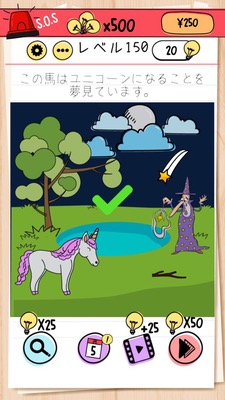
Brain Test Level 150 Walkthrough: Swipe the Star on the Top Right to the Sky
Brain Test Level 150 Walkthrough: Swipe the Star on the Top Right to the Sky
Complete Walkthrough・Step-by-Step Explanation・Common Mistakes
🧩 Level Information
- Level Number:150
- Task:Swipe the star on the top right to the sky
- Difficulty:Easy
🎯 Objective
Grab the star icon on the top right of the screen and swipe it toward the sky to remove it.
📝 Steps to Solve
- Look carefully at the screen and find the star (★) symbol on the top right.
- Place your finger on the star, hold it down, and swipe upward (toward the sky) while holding it.
- Once the star moves toward the sky and disappears, the stage is cleared.
💡 Hints
- Hint 1: As it says "the star on the top right," start by closely observing the top right of the screen.
- Hint 2: Simply tapping the star will do nothing. Try dragging or swiping it.
- Hint 3: Try swiping the star upward, where the sky is, not downward.
🧠 Explanation & Point
This stage is a simple intuitive puzzle where the task itself is a hint at the solution. By following the instruction "Swipe the star on the top right to the sky," you can clear it by finding the star on the top right and swiping it upward, where the sky is. Many players initially attempt to tap the star or manipulate other objects, but recalling the game's unique rule of "swiping objects off the screen" is key. There is no specific order or timing required; you just need to drag the star upward, making it a level akin to a confirmation test.
🔍 Common Mistakes
- Only tapping the star and waiting for a reaction.
- Swiping the star to the left, right, or downward, causing nothing to happen and getting stuck.
- Swiping other parts (like the sky or background), failing to realize that the star itself needs to be dragged.
- Trying to move only within the screen and not swiping boldly off the screen (further upward).
🎉 Advice After Clearing
By swiping the star on the top right upward to make it disappear, you've cleared the stage. It was a straightforward operation confirmation stage. In the next level, even for similar "follow the instructions" types, you may require a slightly more twisted idea.