Level walkthrough
Brain Test Level 144 Walkthrough: Make an emergency call with the phone on the right
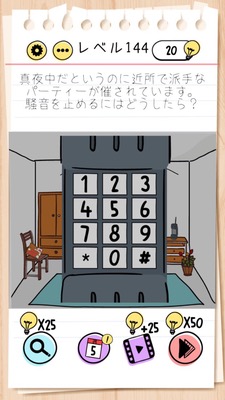
Brain Test Level 144 Walkthrough: Make an emergency call with the phone on the right
Complete Strategy, Step-by-Step Explanation, Common Mistakes
🧩 Level Information
- Level Number: 144
- Question: Input 110 on the phone on the right
- Difficulty: normal
🎯 Objective
Zoom in on the phone on the right and enter "110" on the displayed dial.
📝 Step-by-Step Solution
- Locate the illustration of a phone (smartphone) on the right side of the screen.
- Zoom (enlarge) by using a pinch-out gesture with two fingers on the phone on the right. *Gesture to spread outwards on the screen.
- Make sure the phone is enlarged so that the number keys (keypad) are clearly visible.
- Tap the enlarged phone's number keys and press "1", "1", "0" in order.
- If you enter '110' correctly, you clear the stage.
💡 Hints
- Pay attention to the word 'zoom' first. Think about where you can expand in the screen.
- There should be a picture of a phone on the right. Try spreading it with two fingers.
- When you zoom in on the phone, the number keys become usable. Try entering Japan's emergency number '110'.
🧠 Explanation & Points
As the problem statement clearly mentions 'zoom the phone on the right', this is a puzzle that encourages the use of basic smartphone operations like pinch-out (zoom) instead of just normal tapping. In Brain Test, the text written directly on the screen is often a hint to the answer, and this stage is no exception. '110' is an emergency number in Japan that connects to the police, and you need to connect the keywords "phone", "zoom", and "110". This stage aims to remind players of the game-specific operation 'can zoom the screen'.
🔍 Common Mistakes
- Repeatedly tapping just thinking something will happen if you just tap the phone on the right.
- Attempting to zoom on the phone or other objects on the left.
- Trying to enter '110' on the screen without zooming, getting stuck because the number keys aren't found.
- Trying various special operations like long press or swipe, missing the pinch-out (two-finger enlarge).
🎉 Advice After Clearing
If you can zoom the phone and enter '110', you clear the stage. Remembering that you can zoom in on the screen will be useful in future levels.