Level walkthrough
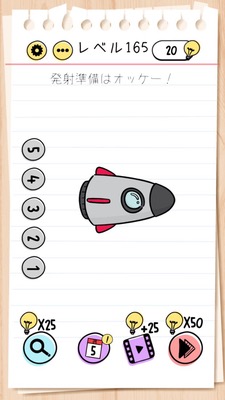
Brain Test Level 165 Walkthrough: Tilt Your Phone to the Side and Tap in Order from 5
Brain Test Level 165 Walkthrough: Tilt Your Phone to the Side and Tap in Order from 5
Full Walkthrough, Step-by-Step Guide, Common Mistakes
🧩 Level Details
- Level Number: 165
- Task: Hold your phone sideways so that the left side is down and tap in order from 5
- Difficulty: Normal
🎯 Objective
Rotate your phone so the left side is down, and then tap the numbers on the screen in order starting from "5" to complete the level.
📝 Step-by-Step Guide
- First, check the arrangement of numbers on the screen, but don't tap them yet.
- Physically rotate your phone. Hold it sideways with the left side down (so that the left side is towards the floor) by rotating it 90 degrees clockwise.
- In this sideways position, check how the lineup of numbers appears. They should now be in an order where '5' is the first (the start).
- In that position, tap the number '5'.
- Continue to tap the numbers in ascending order from 5 (e.g., 5 → 6 → 7 → 8 → 9...), following the order on the screen.
- Once you have tapped all the required numbers in order from 5, the stage will be cleared. You can then return the phone to its original orientation.
💡 Hints
- Simply pressing the numbers as they appear initially won't work. There may be a trick involving the device itself.
- Pay attention to the phrase 'left side'. You need to change the orientation of the entire phone, not just the screen.
- After tilting your phone so the left side is down, look at how the numbers are aligned. It should be set up so you can naturally tap from '5' onwards in order.
- Follow the instruction 'in order from 5' by tapping in ascending order starting from 5 to clear the stage.
🧠 Explanation & Key Points
This level is a 'device gimmick' type challenge that expects players to change the orientation of their phone, rather than interacting with buttons or numbers on the screen. The Japanese instruction "Tilt your phone to the side so the left side is down and tap in order from 5" includes the solution itself, but if you only focus on the screen as usual, you might overlook the idea of changing the orientation. The key lies in tilting your phone so the left side is down, which changes the relative positioning of the numbers and makes it appear so you can press them in sequence starting from '5'. Many players keep looking for a sequence that can be pressed in order while holding the phone vertically and fail repeatedly, so realizing that the target of the action is the device's orientation rather than the 'screen' is critical.
🔍 Common Mistakes
- Tapping the numbers in order from 5 without rotating the phone and keeping the current orientation.
- Rotating the phone in the wrong direction (right side down or upside down), which doesn't result in the intended order.
- Skipping the step of rotating to the left side down and assuming that just tapping 5→6→7… will work.
- Attempting to solve the level by swiping the screen or using unnecessary gestures like pinch-to-zoom.
- Repeatedly tapping incorrectly and resetting before completing the sequence.
🎉 Advice After Clearing
After clearing the stage, you will learn the trick of tilting your phone, which will help you in understanding the concept of 'moving the device itself' in future levels. In subsequent levels, new perspectives or device features might be used, so being conscious of the phone's physical operations as well as the screen will ensure smooth progression.