Dreamy Room Level 252 Walkthrough
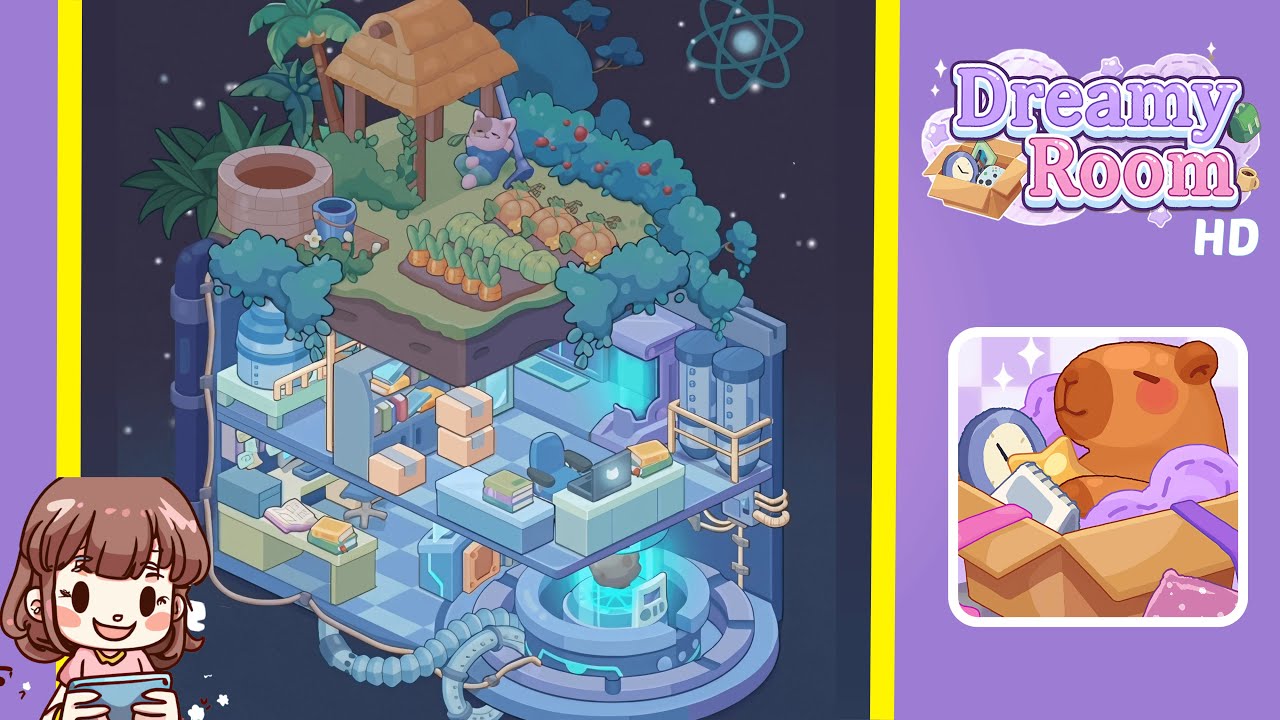
Navigate through Dreamy Room Level 252 by following this detailed guide. Assemble key components to create a balanced environment, blending technological elements with natural beauty.
Step-by-Step Guide
- Begin by placing the circular reactor ring on the front-right platform. Anchor the ring so that its beveled edge faces forward and its inner glow points upward. Attach the console on the ring's right-inner side with the screen facing left. Route the segmented hose and tan cables along specified paths to establish the energy theme.
- Construct the lower workshop along the left wall. Position a long green desk, leave space for an open book at the rear, and stack some books at the front. Add a stool, shelf, and vertical pipe with circular clamps at the exterior. Hang a rope line descending from the middle level.
- Create a mid-level office with shelving, boxes, and a laptop station. Arrange the divider shelf slightly left of center, stack moving boxes asymmetrically, and place counters and a chair in the right half. Ensure the laptop is positioned correctly, and seat a cyan-lit doorway in the wall behind.
- Install twin storage tanks and a safety rail on the far-right of the mid-level. Positioned side-by-side, thread a copper utility line down the right exterior and complete it with a rope ladder. Verify the cyan wall lighting connects with this area.
- Raise the rooftop garden slab, ensuring the soil is flush with the ledge. Border with teal shrubs and plant a row of carrots. Group several pumpkins and place two palm trees and a blue-leaf tree for structural greenery.
- Add a well, water barrel, and bucket on the garden’s far-left. Align properly for a contrasting utilitarian cluster, ensuring no elements overlap for clarity.
- Erect a hut with vines and nestle a sleeping cat under the roof. Make sure the shrubs do not overlap the hut or cat, ensuring a harmonious placement with the mechanical bottom.
Notes & Precautions
- Correct placement and rotation are crucial. Misalignment may block other objects later on.
- Ensure vertical clearance to avoid clipping issues with the mid-level elements.
- Accurate cable routing is essential to prevent obstruction of the terminal face.
- Remember, there is no timer; enjoy the unhurried, engaging process.
Tips & Tricks
- Place the reactor ring, terminal, and hose first to establish anchor points and sightlines.
- Use symmetry to balance left and right elements, aiding in placement decisions.
- Color cues, such as the laptop’s glow and hedge berries, indicate orientation and prevent rework.