Brain Test Level 460 Walkthrough: Change Shirts Before Feeding
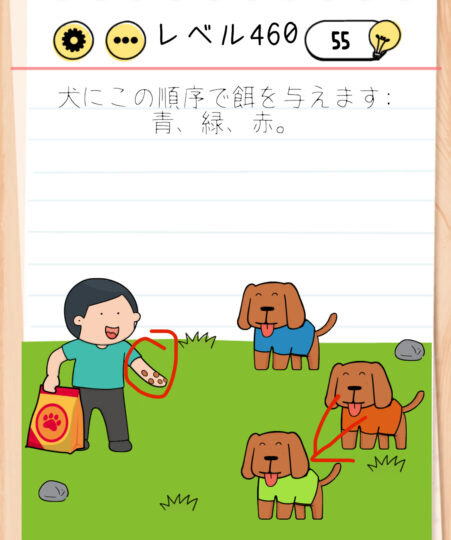
Brain Test Level 460 Walkthrough: Change Shirts Before Feeding
Complete Guide, Step-by-Step Explanation, Common Mistakes
🧩 Level Information
- Level Number: 460
- Question: Swipe to change the green and red shirts, then tap the feed
- Difficulty: Normal
🎯 Objective
Swap the green and red shirts of the character, then tap the feed to clear the stage.
📝 Steps to Solve
- Check the outfits of the two characters on the screen. Notice that one is wearing a green shirt and the other one is wearing a red shirt.
- Tap on the shirt area of the character wearing the green shirt with your finger, and swipe towards the character wearing the red shirt to swap their shirts.
- Alternatively, you can also swipe from the red shirt side towards the green shirt side to swap the shirts. The important thing is to be able to "swap the green and red shirts" by swiping.
- Make sure the shirts are swapped and that the green and red shirts have been moved to the opposite characters.
- With the shirts swapped, tap the "feed" (feed plate, feed box, food icon, etc.) on the screen once.
- After tapping the feed, if the shirts are swapped correctly, the clear sequence will begin, and the level will be cleared.
💡 Hints
- Follow the instructions as written. The order "swipe to change shirts" → "tap the feed" is important.
- Rather than individually removing or dragging the shirts, manipulate them as if you're swiping the shirts of the two characters against each other to achieve the swap.
- If you’re not succeeding, try pressing one of the shirts for a longer duration, then slowly swipe towards the other shirt.
- Remember to tap the feed after swapping the shirts. Tapping the feed first won't react, so be careful with the order.
🧠 Analysis and Key Points
This level tests whether you can execute the instructions written in the text as they are. Rather than a special trick, the key point is noticing the operation of "swiping to exchange shirts." Many players tend to try dragging the clothes individually or tapping the feed first to wait for a reaction, but the solution is very simple: you only need to swipe to swap the shirts of the two characters, then tap the feed to clear. Understanding the order and operation method is crucial.
🔍 Common Mistakes
- Starting by tapping the feed repeatedly and getting stuck because nothing happens.
- Trying to drag the shirt itself to another place, failing because there's no swap detection.
- Trying to swipe the entire character to move them, unable to swap the shirts.
- Releasing your finger too quickly after intending to swap shirts, not realizing the swipe was canceled halfway.
- Getting the order wrong, tapping the feed first and then trying to swap shirts, not meeting the clearing conditions.
🎉 Post-Clear Advice
When the shirts are swapped correctly, tapping the feed will trigger a scene where the character (or animal) looks satisfied eating the feed, or the situation improves, clearing the level. This stage is a restful break solvable with simple actions, so refresh yourself for the next level.