Brain Test Level 450 Walkthrough: Change the clock time with an arrow
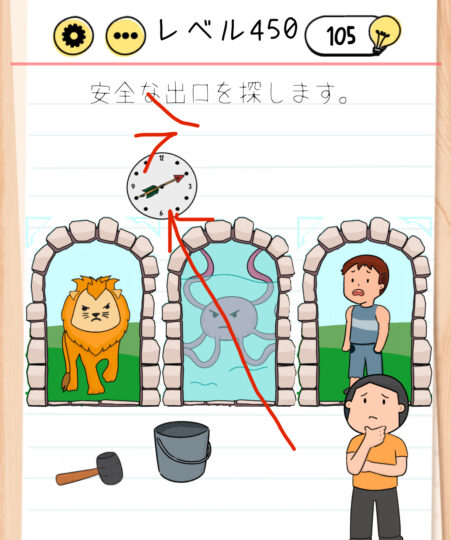
Brain Test Level 450 Walkthrough: Change the clock time with an arrow
Complete Solution, Step-by-Step Explanation, Common Mistakes
🧩 Level Information
- Level Number: 450
- Question: Swipe the arrow on the clock and swipe right to change the time
- Difficulty: Normal
🎯 Objective
Overlay the arrow on the screen onto the clock, then swipe to the right to change the clock's time and clear the puzzle.
📝 Steps to Solve
- First, locate the "arrow" icon on the screen.
- Press and hold the arrow, drag it, and place it at the center of the clock (near the base of the hands).
- Ensure the arrow is positioned on the clock, resembling the clock hands.
- While keeping the arrow on the clock, swipe the clock to the right (either the entire clock or the arrow can be swiped to the right).
- Swiping to the right will change the clock's time and trigger the stage clear condition.
💡 Hints
- Simply tapping the clock won't change the time. Use another item.
- The "arrow" on the screen might not be a decoration; it could serve as the clock's hands. Try dragging it.
- Once the arrow is overlaid on the clock’s center, swipe right in that state to advance the time.
🧠 Explanation & Key Points
This stage tests your ability to notice the compound operation of 'drag + swipe' instead of just tapping. The problem statement itself directly indicates how to solve it, so the difficulty isn't high if you read the Japanese text straight. However, players new to Brain Test might overlook the "swipe the arrow onto the clock" expression and attempt to manipulate only the clock. The crux lies in setting the arrow as the clock hand and then swiping right to change the time. Regarding the UI, placing the arrow near the center of the clock often suffices, and precise positioning isn't needed. There is no specific time to set; it counts as cleared once the time changes.
🔍 Common Mistakes
- Repeatedly tapping or holding the clock, waiting for the time to change.
- Swiping the arrow right off the screen, missing the idea of combining it with the clock.
- Misunderstanding the clock mechanism as changing when tilting or rotating the smartphone.
- Attempting to swipe the clock’s numbers directly, forgetting to use the arrow.
🎉 Post-Clear Advice
After changing the clock time, you can advance to the next level with a clear stage animation. This stage teaches you to use the arrow not just as decoration but as the clock’s hands.