Brain Test Level 433 Walkthrough: Move the "=" Below Next to the Orange
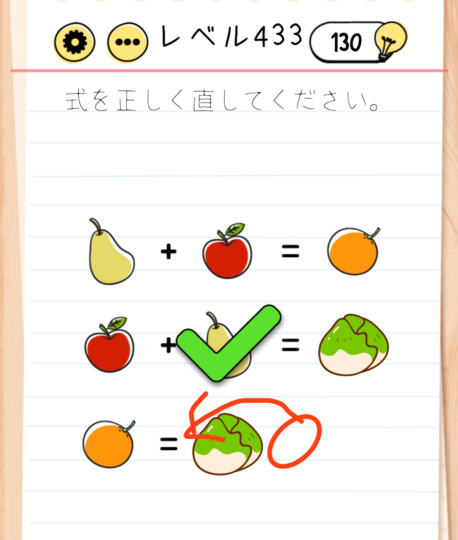
Brain Test Level 433 Walkthrough: Move the "=" Below Next to the Orange
Complete Solution, Step-by-Step Guide, Common Mistakes
🧩 Level Information
- Level Number: 433
- Challenge: Swipe the = below next to the orange
- Difficulty: Easy
🎯 Objective
Swipe and drag the "=" symbol at the bottom of the screen to move it right next to the orange.
📝 Steps to Solve
- Look carefully for the "=" symbol at the bottom of the screen. It might be slightly faded, so don't overlook it.
- Place your finger on the "=" symbol, hold it down or gently tap and swipe horizontally to see if it can be moved.
- Once the "=" starts moving, drag it to the top of the screen where the "orange" icon is located.
- Release your finger to position the "=" right next to the orange (either side is fine).
- The stage clears once the "=" is correctly positioned next to the orange.
💡 Hints
- The instruction 'Swipe the = below next to the orange' in the challenge is the answer itself.
- The '=' symbol is not merely decorative but an interactive object that can be dragged.
- Simply tapping won't do anything, so make sure to swipe (drag) to change its position.
- You don't need to move the orange itself, only the '=' symbol at the bottom of the screen.
🧠 Analysis & Key Points
This level is the straightforward puzzle type where the challenge text itself provides the solution method. It teaches players to 'read carefully' and 'try moving any element on the screen'. Many players often attempt to tap the orange or other objects and try to complete an equation, but the essence is a simple operation of dragging the "=" next to the orange. In Brain Test, letters and symbols are often interactive objects, requiring flexible thinking not to assume they are fixed.
🔍 Common Mistakes
- Trying to tap or swipe the orange to move its position.
- Misunderstanding that simply tapping the '=' will trigger something without attempting to drag.
- Focusing too much on central screen objects and overlooking the 'equals' symbol at the bottom.
- Repeatedly trying unnecessary actions to complete an equation by searching for other symbols or numbers.
🎉 Advice After Clearing
You will grow accustomed to the unique Brain Test mechanics of 'letters and symbols may be interactive' in these stages. In the future, there are cases where what's written in the challenge text is itself a solution hint, so cultivating a habit of reading the text thoroughly will be useful for the next levels.