Brain Test Level 415 Walkthrough: Attach the Circle to the Corner of the Same Color
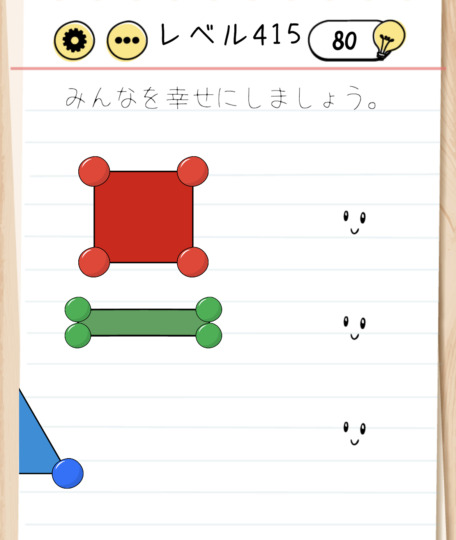
Brain Test Level 415 Walkthrough: Attach the Circle to the Corner of the Same Color
Complete Solution · Step-by-step Guide · Common Mistakes
🧩 Level Information
- Level Number: 415
- Problem Statement: Swipe the circle to attach it to the corner of the same color. Swipe the figure to the left to make the blue corners into one and attach the circle.
- Difficulty: Hard
🎯 Objective
Clear the stage by correctly attaching all the circles to corners of the same color.
📝 Solution Steps
- Make sure there are colorful figures on the screen with several ‘circles’ of the same color placed around or near them.
- For circles like red, yellow, and green, look for the visible ‘corners’ of the same color (colored edges of the figure).
- Hold and drag the red circle, swipe it to the position of the red corner, and release to attach the circle to the corner.
- Similarly, drag and attach the yellow, green, and other colored circles to their corresponding corners.
- Finally, only the ‘blue circle’ should be left, but notice that in the visible range, there is no single blue corner.
- Try swiping the figure itself to the left (imagine moving the ‘figure/frame’ instead of the circle).
- Swiping the figure to the left will make the scattered blue corners overlap to form ‘one blue corner’.
- Once the blue corners are combined into one, drag the blue circle, swipe to the position of the blue corner, and release to attach it.
- If all colored circles are correctly attached to corners of the same color, the stage is cleared.
💡 Hints
- First, try dragging the easily distinguishable colored circles like red, yellow, and green to the corners of the same color.
- If you can't find where the blue circle should go, consider whether you can move the ‘figure itself’ instead of just the ‘corner’.
- Swiping the figure to the left should change the positional relationship of the blue corners.
- Overlap the figure to make one blue corner and then attach the blue circle.
🧠 Analysis & Tips
This level is a trick puzzle that combines the basic operation of ‘dragging the circle to the corner of the same color’ with a hidden element of moving the figure itself. For circles like red, yellow, and green, swipe them to the corresponding corners. However, the blue one does not appear to have a single matching corner. Many players may feel that ‘there aren't enough blue corners’ or ‘the layout is wrong,’ but in fact, swiping the entire figure to overlap the blue corners to make one is the correct answer. The aim of this question is to teach the Brain Test-specific concept of ‘not only the circles can be moved, but sometimes backgrounds or figures can be swiped as well’.
🔍 Common Mistakes
- Forcibly trying to attach the blue circle to a corner of a different color.
- Misunderstanding that there aren't enough blue corners, repeatedly releasing and returning the circle without trying to move the figure.
- Assuming only circles could be moved, not trying to swipe figures or backgrounds.
- Swiping the figure to the right or moving it up and down, giving up without making one blue corner.
- Quickly tapping without holding, mistaking the failure of the drag operation for a bug.
🎉 Advice After Clearing
Once you think about moving the figure itself, these kinds of trick problems will become easier to solve. Consider whether backgrounds or objects might be movable in the next level as well.