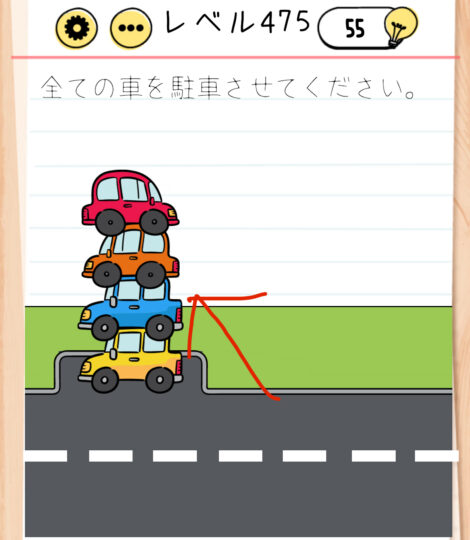
Brain Test Level 475 Walkthrough: Stack the Cars on Top
Brain Test Level 475 Walkthrough: Stack the Cars on Top
Complete Solution, Step-by-step Explanation, Common Mistakes
🧩 Level Information
- Level Number: 475
- Question: Stack the cars on top
- Difficulty: Hard
🎯 Objective
Make multiple cars on the screen stack on top of each other vertically, instead of lining up side by side.
📝 Steps to Solve
- First, check the positions of the cars lined up on the screen. Ensure that there are no obvious control panels such as buttons or sliders.
- Swipe or drag the cars, roads, or backgrounds on the screen, and confirm that they do not stack neatly on top of each other (this level cannot be solved with normal drag operations).
- Gently tilt the device about 90 degrees to the right or left.
- When tilted, the cars will slide towards the screen's edge as if gravity has changed, stacking vertically at the edge.
- Once the cars are correctly "stacked on top" of each other, the stage will automatically be cleared.
- If they do not stack correctly at once, slightly adjust the device's orientation or tilt it to the opposite side to find a position where the cars stack vertically.
💡 Hints
- It should be difficult to neatly stack the cars vertically by just dragging them. Consider other methods of operation.
- In Brain Test, there are sometimes questions that require operations outside the screen, such as shaking or tilting the device.
- Use a "force" that makes the cars move automatically to gather them together in one place.
- Try tilting the device significantly to either left or right. A movement suggesting a change in gravity should occur.
- Tilt the device so that the cars slide to the edge of the screen, resulting in a vertical stack.
🧠 Explanation & Key Points
The key to this level is whether you can think beyond the simple idea of stacking cars by dragging them, as instructed by "stack the cars on top." Normally, players might try to drag each car and stack it on top of others, but due to hit detection or alignment requirements, it's designed so this does not easily result in a vertical stacking state. The Brain Test series often includes problems that use physical operations like tilting or shaking the device itself, in addition to tapping or dragging within the screen. This stage is one of those where tilting the device about 90 degrees to either side makes the cars slide as if obeying "gravity," naturally stacking vertically at the screen's edge. In other words, "stack on top" isn't about "placing by hand," but "tilting to slide and creating a state where they are stacked on top as a result," testing whether the player recognizes the device itself as an object to operate, making it a late-stage conceptual puzzle.
🔍 Common Mistakes
- Trying to forcibly stack the cars on top of each other by dragging them one by one. It often doesn’t work due to precise positioning requirements, leading to assumptions of a bug.
- Attempting to stack by pinching in/out to resize the cars. In most cases, the car size does not change, leading to no solution.
- Trying to drag the road or background to move the lanes, thinking along the lines of changing lanes.
- Thinking there is a hidden button or elevator that lifts the cars somewhere on screen and continuously tapping in pointless places.
- Failing to come up with the idea of tilting the device, leading to reliance on hints.
🎉 Post-clear Advice
The cars stack neatly, and the clear message is displayed. You've likely re-recognized that physical operations, including moving the device, are part of the puzzle. For future levels, you will be at an advantage if you develop a habit of considering movements beyond the screen.