Brain Test Level 196 Walkthrough: Tap in the order of Yellow, Blue, Red, Red, Green
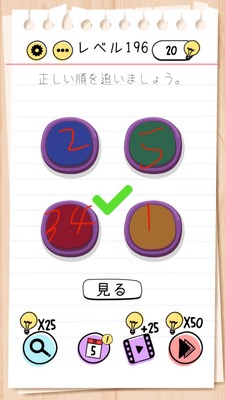
Brain Test Level 196 Walkthrough: Tap in the order of Yellow, Blue, Red, Red, Green
Complete Walkthrough, Step-by-Step Guide, Common Mistakes
🧩 Level Information
- Level Number: 196
- Objective: Tap to See Yellow, Blue, Red, Red, Green in Order
- Difficulty: normal
🎯 Objective
Correctly tap the colored objects on the screen in the order "Yellow → Blue → Red → Red → Green" to clear the level.
📝 Steps to Solve
- Identify the colored buttons (or labels with color names) on the screen and ascertain their respective colors.
- First, tap the button/label corresponding to "Yellow" once.
- Next, tap the button/label corresponding to "Blue" once.
- Then, tap the button/label corresponding to "Red" once.
- Tap the same "Red" button/label again to input 'Red' twice in total.
- Finally, tap the button/label corresponding to "Green" once.
- If the sequence of your taps is "Yellow → Blue → Red → Red → Green," the stage is cleared.
💡 Tips
- The only condition is to follow the "Yellow, Blue, Red, Red, Green" order. No unnecessary operations are needed.
- There are two occurrences of 'Red', but often you don't need to look for different reds. Tapping the same red twice counts.
- If you’re confused by multiple colors, first ensure all colors are present, and focus on whether you can press in order rather than looking for missing colors.
- If there’s only one red, tapping that red twice is the correct solution.
🧠 Analysis & Key Points
This level seems like a simple "tap colors in the specified order" stage, but the trick is that 'Red' appears twice consecutively. Many players wonder, "Where's the second Red?" and search the screen, but in reality, you just need to tap the same red button twice consecutively. This is a classic "trick question" that plays on player assumptions. In Brain Test, the rule "you can press the same button multiple times" frequently appears, so getting accustomed to this pattern through this level is important. Logically, the problem statement doesn’t specify "press a different Red," so as long as the condition 'Red' is met, multiple taps on the same object are consistent. Recognizing this is the key.
🔍 Common Mistakes
- Looking for separate red objects because there are two occurrences of 'Red', wasting time.
- Mistaking the problem for a bug or thinking something is missing because there's only one red.
- Not paying attention to the order and tapping random colors, messing up the sequence.
- Confusing the “color of the text” with the “meaning of the text” when tapping the correct color object.
- Pressing Red only once and then moving on to the next color (Green), not satisfying the instruction to have 'Red, Red'.
🎉 Post-Clear Advice
You should have realized that when the same color is specified consecutively, you don't necessarily need to look for different places—you can double-tap the same button. In future levels, always question whether the same object can be used repeatedly to easily uncover tricks.