Brain Test Level 189 Walkthrough: Use the cloud to stop the car
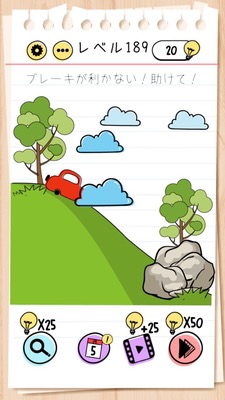
Brain Test Level 189 Walkthrough: Use the cloud to stop the car
Complete Guide, Step-by-Step Explanation, Common Mistakes
🧩 Level Information
- Level Number: 189
- Problem: Use the cloud to stop the car
- Difficulty: normal
🎯 Objective
Operate the cloud to safely stop the car coming down the slope.
📝 Solution Steps
- Focus on the "cloud" on the screen. Nothing happens by just tapping.
- Pinch the cloud with two fingers to enlarge it by pinching out (spreading your fingers).
- Once the cloud is large enough, drag the enlarged cloud to the direction of the car (ahead of the car).
- The car will hit the large cloud, which acts as a cushion-like wall, stopping the car.
- If the car stops, the level is cleared.
💡 Hints
- Focus not only on the car itself or the shape of the slope but also on the "cloud."
- Try not just moving the cloud, but see if you can change its "size."
- Pinch the cloud with two fingers and spread it. Place the enlarged cloud in front of the car to stop it.
🧠 Analysis & Points
This level is a trick puzzle that actively uses the "cloud" that appears to be part of the background on the screen. There are two key points: first, noticing that even the background might be operable, and second, the requirement for smartphone-specific operations like "pinch (enlarge/reduce)" in addition to tapping or dragging.\nMany players initially try intuitive methods such as dragging the car backward, attempting to change the slope's angle, or lifting it, but none of these work. Upon closer inspection of the screen, you realize that the only thing that seems moveable is the cloud. However, simply dragging the cloud is too small to stop the car, so you need to come up with the idea of "changing its size."\nThis shift in thinking leads to a humorous yet less frustrating solution, using the cloud as a physical obstacle to safely stop the car. It is a typical example of applying "pinch to zoom" in smartphone puzzles.
🔍 Common Mistakes
- Trying to stop the car by repeatedly tapping on it.
- Dragging the car in the opposite direction to apply brakes.
- Trying to change the angle of the slope itself by dragging it or lifting it.
- Thinking you can stop the car by just dragging the cloud in front of it, without noticing the size change.
- Trying to change the car's speed by tapping or dragging other objects like the sun or background.
🎉 After-clear Advice
The cloud you thought was part of the background was actually a reliable makeshift airbag. Be sure to use smartphone-specific operations (pinch) moving forward.