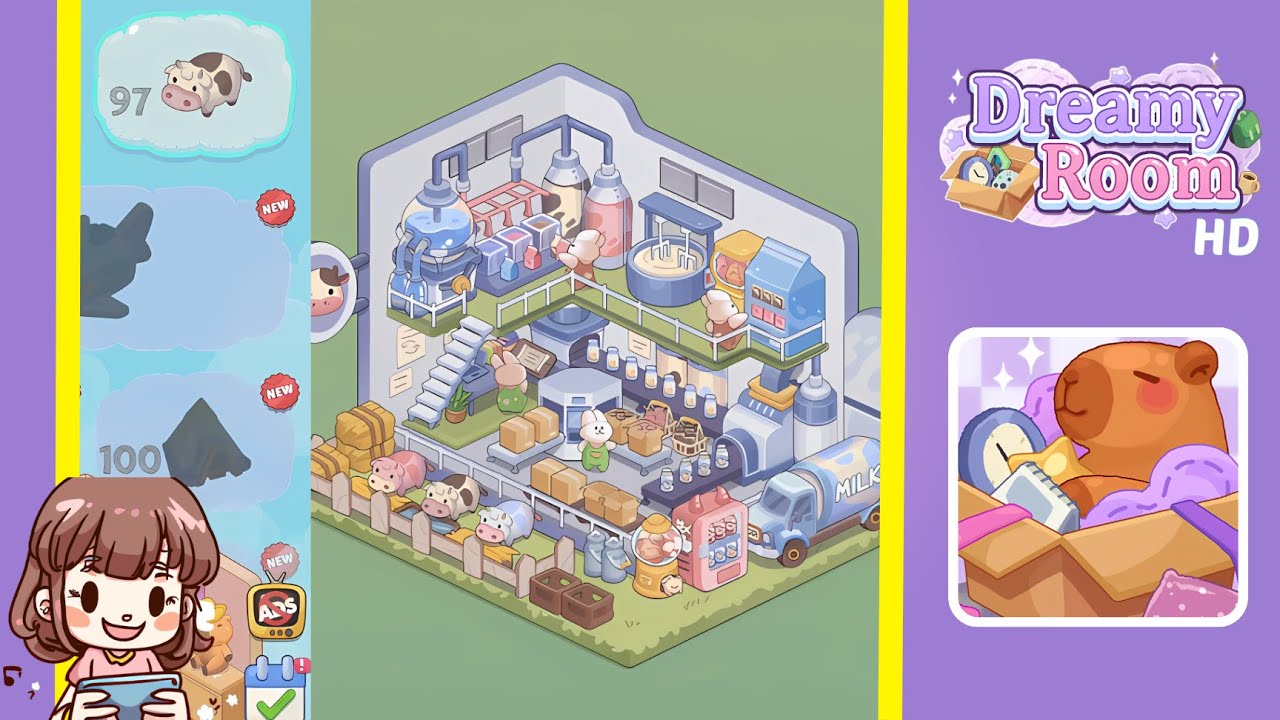
Dreamy Room Level 98 Walkthrough
This guide will help you navigate through Dreamy Room Level 98 by providing detailed instructions for each step, ensuring a perfectly decorated dairy factory setting.
Step-by-Step Guide
- Begin by placing the white wooden fence along the left floor platform. Ensure the fence is flush against the left wall and each slat aligns with the platform edge. Next, line up three rectangular hay bales in front of the fence without overlapping the platform’s edge.
- Position three farm cows in front of the fence on the lower left. Snap the leftmost cow into the feeding trough spot at the far left corner, and space the other two cows evenly along the fence line, ensuring no visible gap.
- Arrange wooden crates and metal milk canisters along the bottom platform. Place crates adjacent to the cows, leaving a walkway clear, then line up milk canisters against the crates, alternating sizes for visual interest.
- Install the conveyor belt along the front edge of the raised platform. Ensure precise alignment with the grid overlay. Place medium cardboard boxes at intervals on the belt, rotating each for a dynamic effect.
- Add the metal staircase, potted plant, elevated walkway, and bunny workers. Position the staircase at the left edge of the back section and the potted plant at its base. Stretch the green walkway with white railings from the staircase, and place three bunny workers along it.
- Place milk bottles, glass jars, and central control station items. Arrange milk bottles on the conveyor belt, glass jars on the hexagonal platform, and the open instruction book on the control station.
- Install back-wall machinery including mixers, silos, and pipes. Position a blue vat in the left corner, silos near the center, a mixing unit connected to pipes, and a kneading tank in the right back corner.
- Position the milk truck, vending machines, and decorative sign. Dock the milk truck at the platform's lower right edge, place vending machines nearby, and affix a circular cow face sign to the left wall.
Notes & Precautions
- Achieving pixel-perfect alignment is crucial due to invisible collision boundaries.
- Be mindful of z-axis stacking; objects placed too early or too late may disappear.
- Rotate decorative components slowly to check for misaligned shadows.
- Avoid layering objects deeper than two levels.
- Use the undo button if objects move unintentionally.
- Dismiss tutorial overlays blocking essential areas to continue placement.
Tips & Tricks
- Segment the area into feeding, supply, control, and delivery zones for efficient placement.
- Enable grid snap for precise 15-degree rotations of objects.
- Lock depth levels after placing key components to prevent accidental shifts.
- Recognize color coding in your inventory to reduce search time.
- Use preview mode to compare your setup with reference images for accuracy.