Brain Test Level 82 Walkthrough: Swipe 8.2 to Complete the Equation
Brain Test Level 82 Walkthrough: Swipe 8.2 to Complete the Equation
Full Walkthrough, Step-by-Step Explanation, Common Mistakes
🧩 Level Information
- Level Number: 82
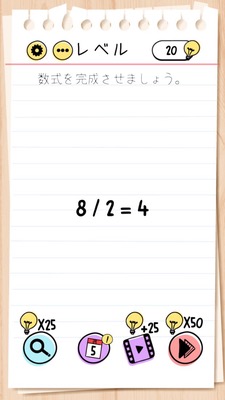
- Question: Swipe the 8.2 in Level 82 to complete the equation
- Difficulty: Normal
🎯 Objective
Swipe the "8.2" displayed on the screen and place it into the blank of the equation to complete the correct equation.
📝 Steps to Solve
- First, confirm that there is an incomplete equation in the center of the screen with a blank (or missing number) somewhere.
- Observe around the equation and notice that normal number buttons or symbols do not fit perfectly to fill in the blank.
- Shift your gaze to the upper part of the screen (near the level display) and confirm the presence of the number "8.2" within the "Level 82" display.
- Try long-pressing the "8.2" with your finger and dragging it.
- While dragging 8.2, swipe it to the blank (or necessary position) of the incomplete equation.
- Release your finger over the blank, fit '8.2' there, and complete the equation as a correct equation to clear the level.
💡 Hints
- Start by thinking about whether you can complete the equation using only the number buttons normally. If it doesn't work, check other places for hints.
- Observe the top of the screen, including level displays and decorations. Even parts that seem unrelated to the puzzle may contain hints.
- Look carefully at the display of '8.2' and try to drag or swipe that number itself.
- Instead of 'entering' a new number into the blank of the equation, you need to bring '8.2' directly and place it there.
🧠 Analysis and Points
This level is a "UI trick puzzle" that can't be solved using normal calculator-like thinking. At first, players try to craft the correct answer using only the given equation and buttons, but this method is deliberately made impossible. The real key is the notation of 'Level 82' displayed at the top of the screen, which includes '8.2'. At first glance, it's just a level display, but in reality, this '8.2' is a draggable object, and moving it into the equation's blank solves the puzzle. This is a common pattern in Brain Test, testing whether players can realize that parts of the UI, like problem statements or level displays, can also be elements of the puzzle.
🔍 Common Mistakes
- Continuing to change combinations using only the number buttons or symbols around the equation in an attempt to make the correct answer somehow.
- Expecting something to happen by tapping the blank, like keyboard input or new numbers appearing, but getting stuck with nothing happening.
- Mistakenly assuming '8.2' is just an explanation display and not trying to touch level displays or backgrounds at all.
- Giving up without trying drag (swipe) operations, waiting for a reaction by just tapping the number '8.2'.
- Dragging 8.2 to a location other than the correct position for the equation, such as the edge of the screen, and misunderstanding the conditions as different when nothing happens.
🎉 Post-Clear Advice
If you can identify that the level display of 8.2 itself is a puzzle piece, you can clear this level quickly. In Brain Test, moving forward, the level number, decorations, and the problem statement itself will often become targets for operation. Developing a habit of 'touching everything on the screen' will help solve puzzles smoothly.