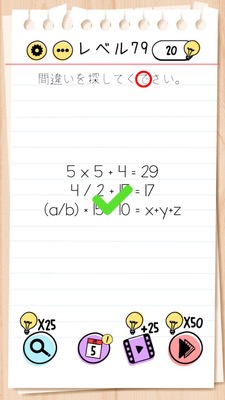
Brain Test Level 79 Walkthrough: Tap on the character "で"
Brain Test Level 79 Walkthrough: Tap on the character "で"
Complete guide, step-by-step explanation, common mistakes
🧩 Level Information
- Level number: 79
- Problem statement: Tap on the character "で"
- Difficulty: Easy
🎯 Objective
Tap on the single hiragana character "で" within the text on the screen.
📝 Steps to Solve
- Carefully read the text "Tap on the character 'で'" displayed in the center of the screen.
- Look for the single hiragana character "で" in the text (the character enclosed in quotation marks).
- Tap only on the part of the text that is the character "で" (do not touch the quotation marks or other text).
- Correctly tapping on "で" will clear the level.
💡 Hints
- Please read the problem statement carefully. No special operations or swipes are necessary.
- It's not about "Which button to push?" but a problem where you need to press "the text itself" that's being displayed.
- Focus only on the single hiragana character within the quotation marks.
🧠 Explanation & Points
This level is a simple "no-tricks" problem that tests whether you can follow the instructions as they are. The target character "で" is already included within the text itself, "Tap on the character 'で'". Players tend to look for other options or buttons, but all you have to do is tap once on the "で" in the text in the center of the screen to clear it. The point is to take the meaning of the text ("Tap on the character 'で'") literally.
🔍 Common Mistakes
- Accidentally tapping on the quotation marks themselves.
- Repeatedly tapping the entire text and losing track of where to press.
- Tapping other UI elements (such as "Next" buttons or menu buttons), mistakenly thinking the answer is outside the problem text.
- Overthinking that there might be some hidden characters and swiping or dragging across the screen.
🎉 Advice After Clearing
Upon tapping "で", you will immediately be judged correct, and you can proceed to Level 80 using the button to advance at the bottom right of the screen.