Level walkthrough
Brain Test Level 363 Walkthrough: Swipe right on the screen to find the hidden C
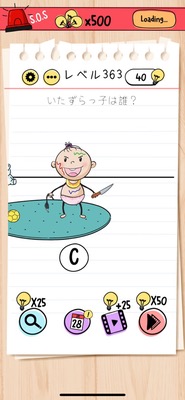
Brain Test Level 363 Walkthrough: Swipe right on the screen to find the hidden C
Complete Guide, Step-by-Step Explanation, Common Mistakes
🧩 Level Information
- Level Number: 363
- Puzzle Text: Swipe left to move the screen right, then tap C
- Difficulty: Easy
🎯 Objective
Swipe the screen as instructed to find and tap the "C" outside the normal display range.
📝 Steps to Solve
- First, check the characters visible on the current screen. Most likely, you won't see C, and only other characters will be displayed.
- Place your finger anywhere on the screen and swipe 'left'. *Moving your finger left makes the screen itself scroll to the right.
- When you swipe and the screen moves to the right, a new area will appear that was not visible before.
- Look for 'C' among the characters that appear on the right side.
- Tap the 'C' character you found.
- If you tap correctly, you clear the stage.
💡 Hints
- Read the puzzle text carefully. Pay attention to the relationship between 'swipe left' and 'move the screen right'.
- Use swipe (drag), not zoom, to move the screen. Try sliding your finger after pressing somewhere on the screen.
- Sliding your finger 'left' causes the display area to move 'right'. Check for any hidden characters on the right.
- There is a 'C' among the newly appeared characters on the right. Tap that 'C' to clear.
🧠 Explanation and Key Points
This level uses a simple trick of contrasting the direction you move your finger with the direction the screen moves. Players tend to try to find the answer from only the characters initially displayed on the screen, but the screen actually continues outside the visible area, and by swiping to scroll, the hidden character 'C' appears. The puzzle text already includes the steps, and performing the instruction 'swipe left to move the screen right and tap C' is the solution. As brain training, this stage tests whether you can discard the assumption of a 'fixed screen' and notice the possibility that the entire field can be moved.
🔍 Common Mistakes
- Only tapping the characters initially visible on the screen and repeatedly tapping the same spot without finding C.
- Overlooking the instruction 'swipe left' and trying to solve it by tapping alone.
- Swiping in the wrong direction (right swipe), causing the screen to move left and finding nothing, resulting in confusion.
- Trying to find C by pinching in/out (zooming) and feeling like the screen can't move, leading to giving up.
🎉 Post-Clear Advice
If you notice that there's space outside the screen, it becomes easier to find hidden elements in future stages. Always try to see if you can move the screen using swipe or drag.