Level walkthrough
Brain Test Level 312 Walkthrough: Attach the Dinosaur Screw to the Robot
Brain Test Level 312 Walkthrough: Attach the Dinosaur Screw to the Robot
Complete Walkthrough, Step-by-Step Guide, Common Mistakes
🧩 Level Info
- Level Number: 312
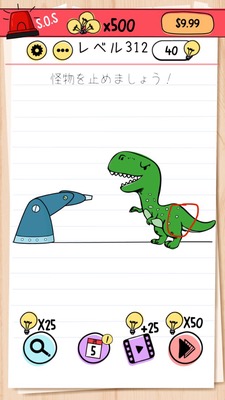
- Task: Attach the screw from the circle part of the dinosaur to the robot
- Difficulty: Easy
🎯 Objective
Remove the screw from the circular mark on the dinosaur on screen, and attach it to the robot.
📝 Steps to Solve
- Check the position of the 'circled screw' attached to the dinosaur's body (or head).
- Press and hold the circled screw with your finger, or tap & drag to grasp it.
- Without releasing your finger, drag the screw to the robot's screw hole (the part where a bolt is missing).
- Bring the screw over the robot's screw hole and release your finger.
- If the screw clicks into the robot, you've cleared it.
💡 Hints
- Observe the dinosaur and robot carefully, and try to find the common 'screw' or 'hole' location.
- The circled part of the dinosaur is not just a decoration, it's a movable 'screw'. Try tapping or dragging.
- Solve it by dragging the screw removed from the dinosaur straight to the missing part (screw hole) of the robot.
🧠 Explanation & Points
This stage is a classic Brain Test gimmick of 'dragging objects on screen to use them on another object'. The task itself is the answer, executing the instruction to 'attach the screw from the circle part of the dinosaur to the robot' is the key. Many players initially try to push buttons or tap the robot to move it, but realizing you can remove the screw on the dinosaur side quickly resolves the puzzle. Trust the instructions and think of dragging suspicious parts (like circles or screws) to solve the puzzle.
🔍 Common Mistakes
- Repeatedly tapping or swiping the robot's body to try and move it.
- Expecting noises or movements from tapping the dinosaur, not realizing the screw can be moved.
- Misunderstanding that tapping the screw will automatically move it, not trying the drag operation.
- Pressing parts that look like robot buttons or switches, overlooking the screw.
🎉 Advice After Clearing
By borrowing the screw from the dinosaur, you've completed the robot. It's key to suspect that parts on screen might be 'movable'.