Level walkthrough
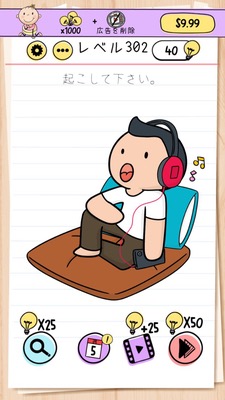
Brain Test Level 302 Walkthrough: Connect the Headphones to the Smartphone
Brain Test Level 302 Walkthrough: Connect the Headphones to the Smartphone
Complete guide, step-by-step explanation, common mistakes
🧩 Level Information
- Level Number: 302
- Statement: Connect the headphone cable to the smartphone
- Difficulty: normal
🎯 Objective
Insert the end of the headphone cable into the smartphone to connect them.
📝 Steps to Solve
- First, closely observe the position of the headphone cable and the smartphone on the screen. The cable appears too short to reach as it is.
- Without forcibly stretching the headphone cable or dragging it off-screen, try moving the smartphone instead.
- Press and hold the smartphone with a finger and drag it towards the headphone cable.
- Continue moving the smartphone until the headphone plug (end) aligns with the smartphone's earphone jack.
- Once the plug and the smartphone jack overlap, an animation or response indicating a "click" will appear, signifying the stage is cleared.
💡 Hints
- You might not be able to make the cable long enough by stretching it. Is there another part you can move?
- Though the smartphone appears fixed, it might be movable if you drag it with a finger. Try interacting with it.
- Instead of moving the headphone plug towards the smartphone, try bringing the smartphone closer to the plug. They will connect automatically if aligned correctly.
🧠 Explanation & Key Points
This stage is a type of puzzle that breaks "apparent fixity." Players usually conceive ideas like extending, pulling, or untangling a cable, but in Brain Test, often backgrounds or the devices can move, and this level is an example of that. The cable is clearly depicted as too short to reach, helping players realize "if it doesn't reach, there must be a different trick." Once players recognize that the smartphone is a movable object, they can solve it with the simple action of aligning the cable end with the earphone jack. The challenge is to adopt the contrary idea of moving the smartphone.
🔍 Common Mistakes
- Attempting to stretch the headphone cable by dragging it strongly. The cable length remains the same, so it doesn't reach no matter how hard you pull.
- Trying to shrink or extend the cable by pinching in or out. Multi-touch operations don't solve it.
- Tapping the smartphone screen to turn it on or operate it to display an earphone mark. The solution is physical alignment, not UI operation.
- Trying to forcibly attach the cable to the smartphone's screen or sides—places other than the jack. There will be no response unless correctly aligned.
- Wasting time attempting to move other objects in the scene like tables or backgrounds. The movable object is the smartphone.
🎉 Advice After Clearing
The key was the reverse idea of moving the smartphone to match the cable. In Brain Test, often things that appear immovable tend to move, so continue to interact with the entire screen without being bound by preconceived notions in the future.