Brain Test Level 295 Walkthrough: Press the Button Text and the Button Itself Simultaneously
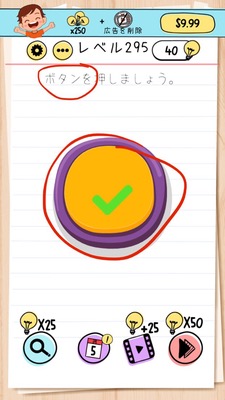
Brain Test Level 295 Walkthrough: Press the Button Text and the Button Itself Simultaneously
Complete Walkthrough, Step-by-Step Explanation, Common Mistakes
🧩 Level Info
- Level Number: 295
- Question: Simultaneously press the button text and the button itself
- Difficulty: Medium
🎯 Objective
Use two fingers to simultaneously tap "the button text" and "the button body" displayed on the screen to clear the level.
📝 Steps to Solve
- Check the main part of the 'button' on the screen (common square button).
- Check where the 'text part' (label text) written on the button is located.
- Prepare to use the multi-touch feature (the ability to tap with two fingers simultaneously) of your smartphone or tablet.
- Prepare one finger to be positioned on the button body and the other on the button text.
- Synchronize and tap the 'button body' and 'button text' simultaneously using two fingers.
- If the simultaneous tap is successful, the button reacts, and the stage is cleared.
💡 Hints
- The button won't react if you just tap it normally once.
- You cannot clear the level by tapping either only the text labeled 'button' or the square button alone.
- The keyword “simultaneously” in this problem is crucial. Be mindful of your device's multi-touch capability.
- Use two fingers to press both the "text part" and the "button itself" together.
🧠 Analysis & Points
This level is a puzzle designed to remind players of the concept of multi-touch (two-finger simultaneous tapping). The statement clearly says "simultaneously press the button text and the button itself," so if you read carefully, it's a hint in itself. However, since one-finger operation is basic in usual gameplay, players tend to tap either only the text or only the button in succession. Here, a shift in thinking is required: 'press simultaneously' = 'use two fingers.' No special dragging or long pressing is needed; it’s a type of trick anyone can solve if the timing is right.
🔍 Common Mistakes
- Tapping only the button text repeatedly.
- Repeatedly tapping only the square button body.
- Tapping in sequence like text→button, button→text, which is not 'simultaneous pressing.'
- Trying to long press or swipe, which doesn’t result in a reaction.
- Assuming it's a device malfunction and persistently tapping the same spot with one finger.
🎉 Advice After Clearing
Did you remember the smartphone-specific trick of tapping with two fingers simultaneously? Other stages also have similar 'simultaneous pressing' problems, so if you develop a habit of trying multi-touch when keywords like 'simultaneously' or 'together' appear in the text, you'll solve them smoothly.