Level walkthrough
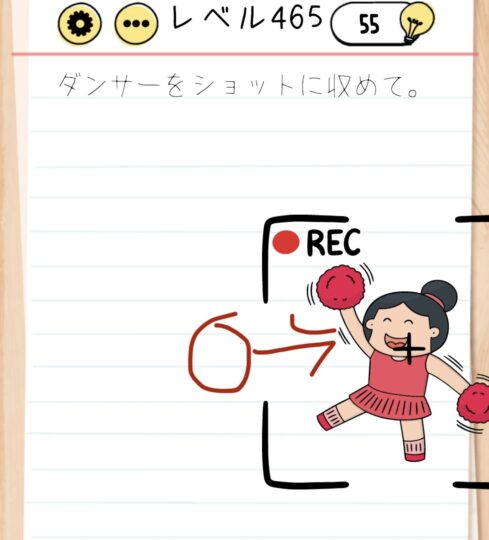
Brain Test Level 465 Walkthrough: Swipe the dancers to fit into the camera
Brain Test Level 465 Walkthrough: Swipe the dancers to fit into the camera
Complete Walkthrough ・ Step-by-Step Explanation ・ Common Mistakes
🧩 Level Information
- Level Number: 465
- Prompt: Swipe the dancers to fit into the camera
- Difficulty: Normal
🎯 Objective
Adjust the positions of all dancers on the screen so that they fit within the camera frame, ready for a photo to be taken.
📝 Step-by-Step Solution
- First, locate the 'camera frame (square frame)' near the center of the screen. You need to fit everyone in here.
- Press and hold each dancer with your finger, then drag (swipe) them into the camera frame.
- Adjust the position of any dancer outside the camera frame or close to the edge to ensure their entire body fits within the square frame.
- If dancers overlap, slightly adjust their positions within the frame to make them all visible. However, make sure their entire body stays within the frame.
- If there are dancers hidden at the side of the screen, swipe left or right to find them and drag them into the camera frame.
- Once all dancers' bodies fit inside the camera frame's four sides with no parts sticking out, the photo is automatically taken, and you clear the stage.
💡 Hints
- Try moving only the dancers, not the camera itself, to change the arrangement.
- The key is 'fitting everyone’s body inside the square frame'. Clearing won't occur if any part sticks out.
- It’s okay for dancers to overlap a bit, so feel free to pack them tightly within the frame.
- Swipe the screen left and right to check if there are dancers at the edge or outside the screen.
🧠 Analysis and Points
This puzzle tests your visual space recognition and drag operation skills. The puzzle prompt directly indicates the solution: 'Swipe the dancers to fit into the camera'. Many players initially try to tap or zoom the camera, but only the dancers' positions should be moved. There's no time limit or swipe count restriction, so take your time to confidently move everyone into the frame one by one. Once you understand that dancers can overlap, fitting everyone into a tight space becomes easier.
🔍 Common Mistakes
- Trying to move the camera or frame. Only the dancers can be moved.
- Attempting pinch operations like zoom in/out, but the display zoom cannot be changed.
- Failing to notice parts of a dancer (such as hands or feet) sticking out of the frame, mistakenly thinking it's a bug.
- Thinking dancers shouldn't overlap, leading to confusion over insufficient space due to focusing on neat alignment.
- Overlooking dancers on the edges or outside of the screen, thinking all are inside the frame when the level doesn't clear.
🎉 Post-Clear Advice
All dancers are snugly captured in the camera for a group photo. Once you've grasped the placement technique, keep in mind 'what can be moved?' in the next levels and carefully observe the entire screen.