Level walkthrough
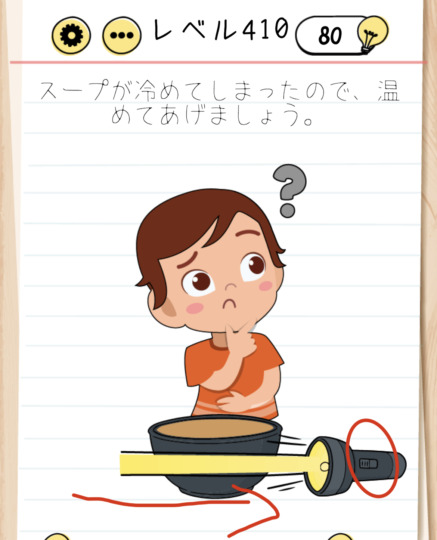
Brain Test Level 410 Walkthrough: Swipe the Light to the Right and Press the Switch
Brain Test Level 410 Walkthrough: Swipe the Light to the Right and Press the Switch
Complete Strategy, Step-by-Step Explanation, Common Mistakes
🧩 Level Information
- Level Number: 410
- Task: Swipe the light to the right and press the switch
- Difficulty: Normal
🎯 Objective
Swipe the light to the right to move it, revealing the switch hidden underneath, and tap to press it.
📝 Steps to Solve
- Check the illustration of the 'Light' located near the center of the screen.
- Place your finger on the light and slowly swipe and drag it to the right.
- Moving the light to the right will reveal a switch on the left side (the original position).
- Tap the now visible switch to press it.
- The switch turns on, and the stage is cleared.
💡 Hints
- If you can't 'swipe the light to the right' as described in the task, try moving the light itself.
- The light is not decorative, it can be moved by dragging. Try to see in which directions it can be moved.
- Once the light is swiped sufficiently to the right, the hidden switch will appear. Tap that switch to clear the level.
🧠 Explanation & Key Points
This stage is a straightforward puzzle where the instruction itself serves as the answer. However, players might easily misinterpret the phrase 'swipe the light to the right' as swiping the character or the screen to the right, and may not realize that the light object itself can be dragged. Moving the light to the right reveals a hidden switch in its original position, and pressing the switch clears the stage. It's not a visual trick so much as it is a familiar Brain Test concept that requires thinking, 'perhaps the object can be moved.'
🔍 Common Mistakes
- Swiping the screen to the right and not realizing the light itself can be dragged.
- Continuously swiping other objects or text on the screen instead of the light.
- Trying to move the light again after the switch appears and forgetting to tap the switch.
- Moving the light only slightly, resulting in not fully revealing the switch and missing it.
🎉 Advice After Clearing
Once you get used to moving the light to find the hidden switch, you'll find the concept of 'objects can be moved' helpful in upcoming stages. In the next levels, always question which parts of the screen might be interactive.